I developed a useful Web page using JavaScript to monitor resource usage and status on your Incus containers on one or more Incus servers.
NOTE: One of my subscribers requested a column for memory utilization and I added that in hindsight. I also modified the initial display to sort by the Incus container name rather than by the host name which seems more appropriate.
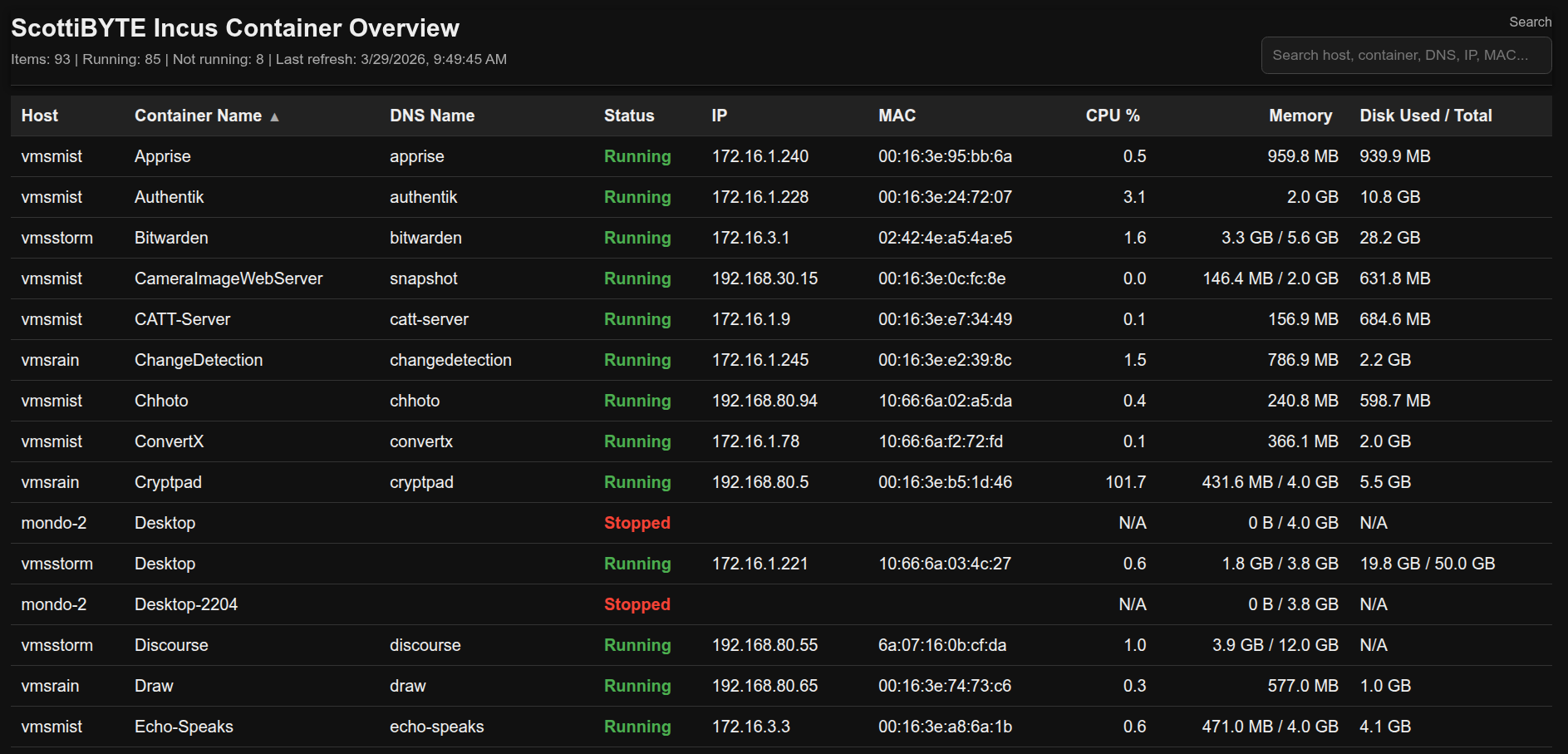
To host the ScottiBYTE Incus Container Utility, start by creating an Incus container for it on one of your Incus servers.
incus launch images:ubuntu/24.04 Incus-Dashboard -p default -p bridgeprofile -c boot.autostart=true
Move inside of the new container.
incus shell Incus-Dashboard
Accept all of the updates and install some dependencies.
apt update && apt upgrade -y
apt install -y nodejs incus-client nano dnsutils openssh-server net-tools -y
Add a user account and put that user in the sudo group.
adduser scott
usermod -aG sudo scott
Log into the new user account.
su - scott
Be sure that you have your Incus server(s) defined with local DNS names on your network. This can easily be done with Pihole and is a requirement for this application.
Remove the symbolic link to the resolv.conf file to support local DNS resolution.
sudo rm /etc/resolv.conf
Edit a file by the same name to create a new file.
sudo nano /etc/resolv.conf
Add the address of your local DNS server as follows. My local DNS is 172.16.0.10. Yours will be different.
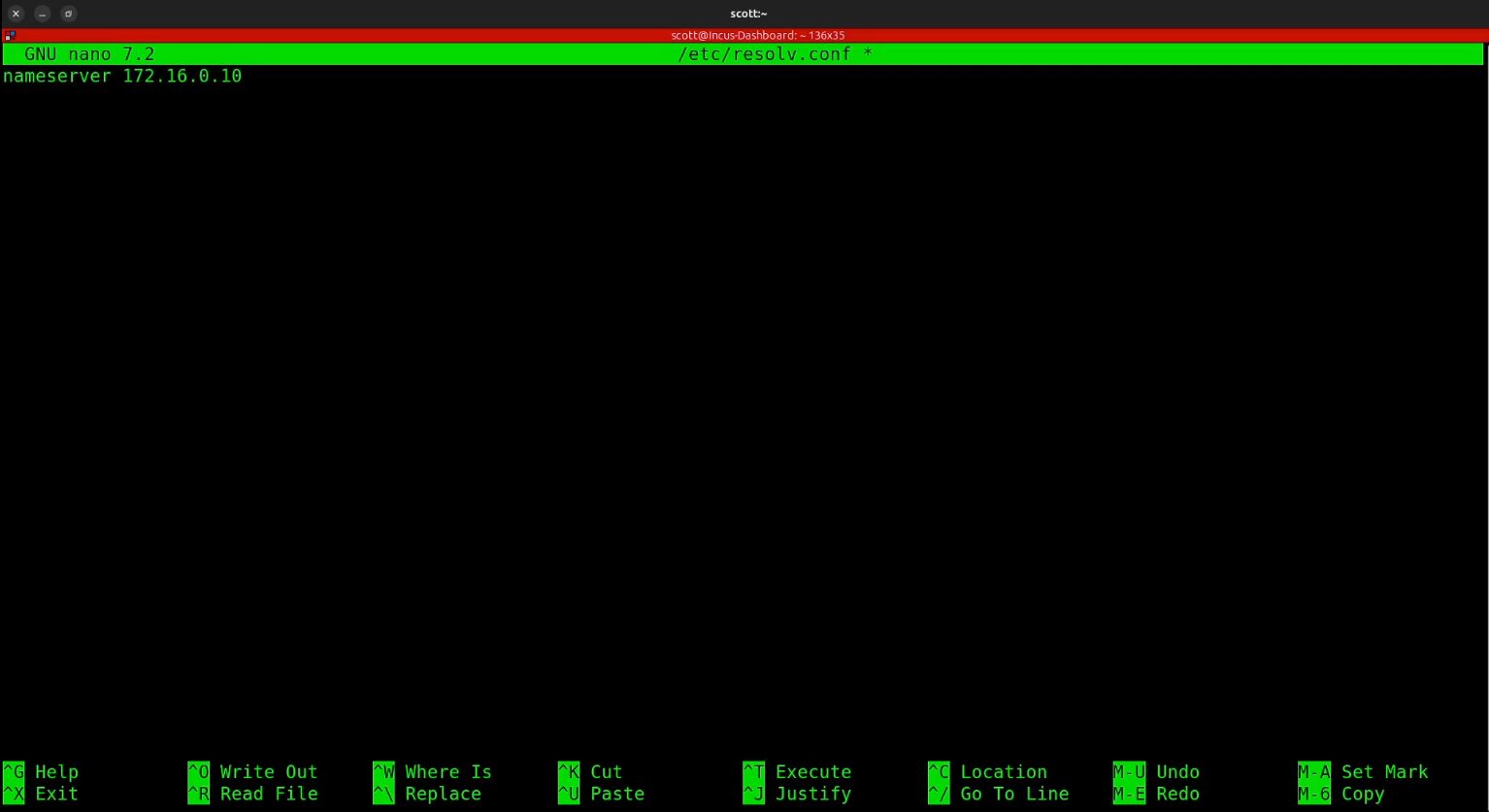
Do a CTRL O and enter to save the file out and a CTRL X to exit the nano editor.
This program works by being able to access the incus servers that you have remote access to manage. You can list these with the command.
incus remote list

To add a remote incus server that you can manage, we must first get a token. I do this via ssh and so it assumes openssh-server is running on the your incus server and that you have a local dns name for that server. My incus server is named “vmsmist”
ssh vmsmist "incus config trust add Incus-Dashboard"

Copy the token that you get back from that command (different from mine above) and then run the following again replacing vmsmist in the two places with the name of your incus server.
incus remote add vmsmist https://vmsmist:8443 --accept-certificate

You will then copy & paste the token you received above.

You can repeat the process above for each Incus server that you have. In the tutorial I did this for two of my Incus servers. Now you can see that vmsmist is listed as a remote server that I can manage.

Now let’s create the code starting with the javascript.
nano server.js
Copy and paste the following code into the editing session.
const http = require('http');
const fs = require('fs');
const path = require('path');
const dns = require('dns').promises;
const { exec } = require('child_process');

const POLL_INTERVAL_MS = 3000;
const previousCpu = new Map();
const reverseDnsCache = new Map();

let latestData = [];
let lastRefresh = null;
let refreshInProgress = false;

function run(cmd) {
  return new Promise((resolve, reject) => {
    exec(cmd, { maxBuffer: 20 * 1024 * 1024 }, (err, stdout, stderr) => {
      if (err) {
        reject(new Error((stderr || err.message).trim()));
        return;
      }
      resolve(stdout);
    });
  });
}

function formatBytes(bytes) {
  const n = Number(bytes) || 0;
  const KB = 1024;
  const MB = KB * 1024;
  const GB = MB * 1024;
  const TB = GB * 1024;

  if (n >= TB) return `${(n / TB).toFixed(1)} TB`;
  if (n >= GB) return `${(n / GB).toFixed(1)} GB`;
  if (n >= MB) return `${(n / MB).toFixed(1)} MB`;
  if (n >= KB) return `${(n / KB).toFixed(1)} KB`;
  return `${n} B`;
}

function normalizeStatus(status) {
  const s = String(status || '').trim().toLowerCase();
  if (!s) return 'Unknown';
  if (s === 'running') return 'Running';
  if (s === 'stopped') return 'Stopped';
  if (s === 'frozen') return 'Frozen';
  return String(status);
}

function pickIpAndMac(state) {
  const net = state?.network || {};
  const preferredIfNames = ['eth0', 'ens3', 'enp0s3', 'enp5s0', 'enp6s0'];
  const candidates = [];

  for (const [ifname, iface] of Object.entries(net)) {
    if (!iface || ifname === 'lo') continue;

    const addresses = Array.isArray(iface.addresses) ? iface.addresses : [];
    const ipv4 = addresses.find(
      a => a?.family === 'inet' && a.address && !a.address.startsWith('127.')
    );

    if (!ipv4) continue;

    candidates.push({
      ifname,
      ip: ipv4.address,
      mac: iface.hwaddr || ''
    });
  }

  if (candidates.length === 0) return { ip: '', mac: '' };

  for (const ifname of preferredIfNames) {
    const found = candidates.find(c => c.ifname === ifname);
    if (found) return { ip: found.ip, mac: found.mac };
  }

  return { ip: candidates[0].ip, mac: candidates[0].mac };
}

function getDiskDisplay(container) {
  const rootDisk = container?.state?.disk?.root;
  if (!rootDisk) return 'N/A';

  const usage = Number(rootDisk.usage || 0);
  const total = Number(rootDisk.total || 0);

  if (total > 0) return `${formatBytes(usage)} / ${formatBytes(total)}`;
  if (usage > 0) return formatBytes(usage);
  return 'N/A';
}

function parseMemoryLimit(limitValue) {
  if (limitValue === undefined || limitValue === null || limitValue === '') {
    return 0;
  }

  if (typeof limitValue === 'number') {
    return limitValue;
  }

  const text = String(limitValue).trim().toLowerCase();
  if (!text || text === '0') return 0;

  const match = text.match(/^([\d.]+)\s*([kmgt]?ib|[kmgt]?b)?$/i);
  if (!match) return 0;

  const num = parseFloat(match[1]);
  const unit = (match[2] || 'b').toLowerCase();

  const factors = {
    b: 1,
    kb: 1000,
    mb: 1000 ** 2,
    gb: 1000 ** 3,
    tb: 1000 ** 4,
    kib: 1024,
    mib: 1024 ** 2,
    gib: 1024 ** 3,
    tib: 1024 ** 4
  };

  return Math.round(num * (factors[unit] || 1));
}

function getMemoryDisplay(container) {
  const used = Number(container?.state?.memory?.usage || 0);
  const limit = parseMemoryLimit(container?.config?.['limits.memory']);

  if (limit > 0) {
    return `${formatBytes(used)} / ${formatBytes(limit)}`;
  }

  if (used > 0) {
    return formatBytes(used);
  }

  return 'N/A';
}

function getCpuPercentDisplay(key, container) {
  const usageNs = Number(container?.state?.cpu?.usage || 0);
  const nowMs = Date.now();

  if (usageNs <= 0) {
    previousCpu.set(key, { usageNs, tsMs: nowMs });
    return 'N/A';
  }

  const prev = previousCpu.get(key);
  previousCpu.set(key, { usageNs, tsMs: nowMs });

  if (!prev) return 'N/A';

  const deltaUsageNs = usageNs - prev.usageNs;
  const deltaTimeMs = nowMs - prev.tsMs;

  if (deltaUsageNs < 0 || deltaTimeMs <= 0) return 'N/A';

  // 1 full host CPU core over the interval = 100.0
  const cpuPercent = deltaUsageNs / (deltaTimeMs * 1e4);

  if (!Number.isFinite(cpuPercent) || cpuPercent < 0) return 'N/A';

  return cpuPercent.toFixed(1);
}

async function reverseLookup(ip) {
  if (!ip) return '';

  const cached = reverseDnsCache.get(ip);
  const now = Date.now();

  if (cached && now - cached.ts < 5 * 60 * 1000) {
    return cached.name;
  }

  try {
    const names = await dns.reverse(ip);
    const name = Array.isArray(names) && names.length ? names[0] : '';
    reverseDnsCache.set(ip, { name, ts: now });
    return name;
  } catch {
    reverseDnsCache.set(ip, { name: '', ts: now });
    return '';
  }
}

async function discoverRemotes() {
  const stdout = await run('incus remote list --format=csv');
  const lines = stdout.split('\n').map(x => x.trim()).filter(Boolean);
  const remotes = [];

  for (const line of lines) {
    const parts = line.split(',');
    const name = (parts[0] || '').replace(/\s+\(current\)$/i, '').trim();
    const protocol = (parts[2] || '').trim().toLowerCase();
    const isPublic = (parts[4] || '').trim().toUpperCase() === 'YES';

    if (!name) continue;
    if (name === 'local') continue;
    if (isPublic) continue;
    if (protocol !== 'incus') continue;

    remotes.push(`${name}:`);
  }

  return remotes;
}

async function fetchRemoteContainers(remote) {
  try {
    const stdout = await run(`incus list ${remote} --format=json`);
    const items = JSON.parse(stdout);
    const host = remote.replace(/:$/, '');

    const base = items.map(c => {
      const net = pickIpAndMac(c.state || {});
      const key = `${host}:${c.name || ''}`;

      return {
        host,
        name: c.name || '',
        status: normalizeStatus(c.status),
        ip: net.ip,
        mac: net.mac,
        cpu: getCpuPercentDisplay(key, c),
        memory: getMemoryDisplay(c),
        disk: getDiskDisplay(c),
        type: c.type || ''
      };
    });

    return await Promise.all(
      base.map(async item => ({
        ...item,
        dns_name: await reverseLookup(item.ip)
      }))
    );
  } catch {
    return [];
  }
}

async function refreshData() {
  if (refreshInProgress) return;
  refreshInProgress = true;

  try {
    const remotes = await discoverRemotes();
    const arrays = await Promise.all(remotes.map(fetchRemoteContainers));

    latestData = arrays.flat().sort((a, b) => {
      if (a.host !== b.host) return a.host.localeCompare(b.host);
      return a.name.localeCompare(b.name);
    });

    lastRefresh = new Date().toISOString();
  } finally {
    refreshInProgress = false;
  }
}

refreshData();
setInterval(refreshData, POLL_INTERVAL_MS);

const server = http.createServer((req, res) => {
  const pathname = req.url.split('?')[0];

  if (pathname === '/api/containers') {
    res.writeHead(200, { 'Content-Type': 'application/json' });
    res.end(JSON.stringify({
      refreshedAt: lastRefresh,
      intervalMs: POLL_INTERVAL_MS,
      containers: latestData
    }));
    return;
  }

  if (pathname === '/' || pathname === '/index.html') {
    const filePath = path.join(__dirname, 'index.html');
    fs.readFile(filePath, (err, data) => {
      if (err) {
        res.writeHead(500, { 'Content-Type': 'text/plain' });
        res.end('Failed to load index.html');
        return;
      }

      res.writeHead(200, { 'Content-Type': 'text/html' });
      res.end(data);
    });
    return;
  }

  res.writeHead(404, { 'Content-Type': 'text/plain' });
  res.end('Not found');
});

const PORT = 80;

server.listen(PORT, '0.0.0.0', () => {
  console.log(`Dashboard running on port ${PORT}`);
});
Save the file with a CTRL O and enter and CTRL X to exit the nano editor.
Now create the webpage.
nano index.html
Paste the following into the editor.
<!DOCTYPE html>
<html>
<head>
<meta charset="UTF-8">
<title>Incus Dashboard</title>
<style>
body {
background: #111;
color: #eee;
font-family: Arial, sans-serif;
margin: 20px;
}
.header {
position: sticky;
top: 0;
background: #111;
z-index: 1000;
padding: 0 0 10px 0;
border-bottom: 1px solid #333;
box-shadow: 0 2px 6px rgba(0, 0, 0, 0.6);
}
.header-top {
display: flex;
justify-content: space-between;
align-items: flex-start;
gap: 16px;
}
.header-left {
min-width: 0;
}
.header-right {
min-width: 280px;
text-align: right;
}
h2 {
margin: 0 0 8px 0;
padding-top: 4px;
}
.meta {
color: #aaa;
font-size: 14px;
}
.search-label {
display: block;
color: #aaa;
font-size: 13px;
margin: 4px 0 6px 0;
}
.search-box {
width: 280px;
max-width: 100%;
box-sizing: border-box;
background: #1b1b1b;
color: #eee;
border: 1px solid #444;
border-radius: 6px;
padding: 9px 10px;
font-size: 14px;
outline: none;
}
.search-box:focus {
border-color: #777;
box-shadow: 0 0 0 2px rgba(255,255,255,0.08);
}
table {
width: 100%;
border-collapse: collapse;
margin-top: 10px;
}
th, td {
padding: 10px;
border-bottom: 1px solid #333;
text-align: left;
vertical-align: top;
}
th {
background: #222;
position: sticky;
top: 96px;
z-index: 900;
cursor: pointer;
user-select: none;
white-space: nowrap;
}
th:hover {
background: #2a2a2a;
}
tr:hover {
background: #1a1a1a;
}
.running {
color: #4caf50;
font-weight: bold;
}
.notrunning {
color: #f44336;
font-weight: bold;
}
.right {
text-align: right;
white-space: nowrap;
}
.sort-indicator {
color: #aaa;
font-size: 12px;
margin-left: 6px;
}
.no-results {
color: #aaa;
text-align: center;
padding: 18px;
font-style: italic;
}
@media (max-width: 900px) {
.header-top {
flex-direction: column;
}
.header-right {
min-width: 0;
width: 100%;
text-align: left;
}
.search-box {
width: 100%;
}
th {
top: 132px;
}
}
</style>
</head>
<body>
<div class="header">
<div class="header-top">
<div class="header-left">
<h2>ScottiBYTE Incus Container Overview</h2>
<div class="meta" id="meta">Loading...</div>
</div>
<div class="header-right">
<label class="search-label" for="searchBox">Search</label>
<input
id="searchBox"
class="search-box"
type="text"
placeholder="Search host, container, DNS, IP, MAC..."
autocomplete="off"
>
</div>
</div>
</div>
<table>
<thead>
<tr>
<th data-sort="host">Host<span class="sort-indicator" id="ind-host"></span></th>
<th data-sort="name">Container Name<span class="sort-indicator" id="ind-name"></span></th>
<th data-sort="dns_name">DNS Name<span class="sort-indicator" id="ind-dns_name"></span></th>
<th data-sort="status">Status<span class="sort-indicator" id="ind-status"></span></th>
<th data-sort="ip">IP<span class="sort-indicator" id="ind-ip"></span></th>
<th data-sort="mac">MAC<span class="sort-indicator" id="ind-mac"></span></th>
<th class="right" data-sort="cpu">CPU %<span class="sort-indicator" id="ind-cpu"></span></th>
<th class="right" data-sort="memory">Memory<span class="sort-indicator" id="ind-memory"></span></th>
<th data-sort="disk">Disk Used / Total<span class="sort-indicator" id="ind-disk"></span></th>
</tr>
</thead>
<tbody id="table"></tbody>
</table>
<script>
let currentData = [];
let currentSort = { key: 'name', direction: 'asc' };
let currentSearch = '';
function esc(v) {
return String(v ?? '')
.replace(/&/g, '&')
.replace(/</g, '<')
.replace(/>/g, '>')
.replace(/"/g, '"')
.replace(/'/g, ''');
}
function parseCpu(value) {
const n = parseFloat(value);
return Number.isFinite(n) ? n : -1;
}
function parseBytes(text) {
if (!text || text === 'N/A') return -1;
const firstPart = String(text).split('/')[0].trim();
const match = firstPart.match(/^([\d.]+)\s*(B|KB|MB|GB|TB)$/i);
if (!match) return -1;
const num = parseFloat(match[1]);
const unit = match[2].toUpperCase();
const factors = {
B: 1,
KB: 1024,
MB: 1024 ** 2,
GB: 1024 ** 3,
TB: 1024 ** 4
};
return num * factors[unit];
}
function compareIp(a, b) {
const pa = String(a || '').split('.').map(x => parseInt(x, 10));
const pb = String(b || '').split('.').map(x => parseInt(x, 10));
for (let i = 0; i < 4; i++) {
const va = Number.isFinite(pa[i]) ? pa[i] : -1;
const vb = Number.isFinite(pb[i]) ? pb[i] : -1;
if (va !== vb) return va - vb;
}
return 0;
}
function compareValues(a, b, key) {
if (key === 'cpu') {
return parseCpu(a.cpu) - parseCpu(b.cpu);
}
if (key === 'memory') {
return parseBytes(a.memory) - parseBytes(b.memory);
}
if (key === 'disk') {
return parseBytes(a.disk) - parseBytes(b.disk);
}
if (key === 'ip') {
return compareIp(a.ip, b.ip);
}
const av = String(a[key] ?? '').toLowerCase();
const bv = String(b[key] ?? '').toLowerCase();
return av.localeCompare(bv);
}
function updateSortIndicators() {
document.querySelectorAll('.sort-indicator').forEach(el => {
el.textContent = '';
});
const active = document.getElementById(`ind-${currentSort.key}`);
if (active) {
active.textContent = currentSort.direction === 'asc' ? '▲' : '▼';
}
}
function sortData(data) {
return [...data].sort((a, b) => {
let result = compareValues(a, b, currentSort.key);
if (result === 0) {
result = compareValues(a, b, 'host');
if (result === 0) result = compareValues(a, b, 'name');
}
return currentSort.direction === 'asc' ? result : -result;
});
}
function itemMatchesSearch(item, term) {
if (!term) return true;
const haystack = [
item.host,
item.name,
item.dns_name,
item.status,
item.ip,
item.mac,
item.cpu,
item.memory,
item.disk
]
.map(v => String(v ?? '').toLowerCase())
.join(' ');
return haystack.includes(term);
}
function updateMeta(allData, filteredCount) {
const meta = document.getElementById('meta');
const running = allData.filter(x => String(x.status).toLowerCase() === 'running').length;
const notRunning = allData.length - running;
let text = `Items: ${allData.length} | Running: ${running} | Not running: ${notRunning}`;
if (currentSearch) {
text += ` | Filtered: ${filteredCount}`;
}
const lastRefresh = window.__lastRefreshText || '';
if (lastRefresh) {
text += ` | Last refresh: ${lastRefresh}`;
}
meta.textContent = text;
}
function renderTable(data) {
const tbody = document.getElementById('table');
tbody.innerHTML = '';
const filtered = data.filter(item => itemMatchesSearch(item, currentSearch));
const sorted = sortData(filtered);
for (const c of sorted) {
const isRunning = String(c.status).toLowerCase() === 'running';
const statusClass = isRunning ? 'running' : 'notrunning';
const tr = document.createElement('tr');
tr.innerHTML = `
<td>${esc(c.host)}</td>
<td>${esc(c.name)}</td>
<td>${esc(c.dns_name || '')}</td>
<td class="${statusClass}">${esc(c.status)}</td>
<td>${esc(c.ip || '')}</td>
<td>${esc(c.mac || '')}</td>
<td class="right">${esc(c.cpu || 'N/A')}</td>
<td class="right">${esc(c.memory || 'N/A')}</td>
<td>${esc(c.disk || 'N/A')}</td>
`;
tbody.appendChild(tr);
}
if (sorted.length === 0) {
const tr = document.createElement('tr');
tr.innerHTML = `<td class="no-results" colspan="9">No matching containers</td>`;
tbody.appendChild(tr);
}
updateSortIndicators();
updateMeta(data, filtered.length);
}
async function load() {
try {
const res = await fetch('/api/containers?_=' + Date.now(), { cache: 'no-store' });
const payload = await res.json();
currentData = Array.isArray(payload.containers) ? payload.containers : [];
window.__lastRefreshText = payload.refreshedAt
? new Date(payload.refreshedAt).toLocaleString()
: '';
renderTable(currentData);
} catch (err) {
console.error(err);
document.getElementById('meta').textContent = 'Failed to load dashboard data';
}
}
document.querySelectorAll('th[data-sort]').forEach(th => {
th.addEventListener('click', () => {
const key = th.dataset.sort;
if (currentSort.key === key) {
currentSort.direction = currentSort.direction === 'asc' ? 'desc' : 'asc';
} else {
currentSort.key = key;
currentSort.direction = (key === 'cpu' || key === 'memory' || key === 'disk') ? 'desc' : 'asc';
}
renderTable(currentData);
});
});
document.getElementById('searchBox').addEventListener('input', (e) => {
currentSearch = e.target.value.trim().toLowerCase();
renderTable(currentData);
});
load();
setInterval(load, 3000);
</script>
</body>
</html>
Save the file with a CTRL O and enter and then CTRL X to exit the nano editor.
Now create the systemd service to run the application.
sudo nano /etc/systemd/system/incus-dashboard.service
Insert the following making sure to change “scott” in the five places to your username,
[Unit]
Description=Incus Dashboard
After=network-online.target
Wants=network-online.target

[Service]
Type=simple
User=scott
Group=scott
WorkingDirectory=/home/scott
ExecStart=/usr/bin/node /home/scott/server.js
Restart=always
RestartSec=5
Environment=HOME=/home/scott

[Install]
WantedBy=multi-user.target
I changed the default port 3000 for JavaScript to port 80. You need to run the following to allow use of the privileged port 80.
sudo setcap 'cap_net_bind_service=+ep' $(which node)
Reload the service folder to pick up the changes.
sudo systemctl daemon-reload
Define the service to run on reboot and also start it now.
sudo systemctl enable --now incus-dashboard.service
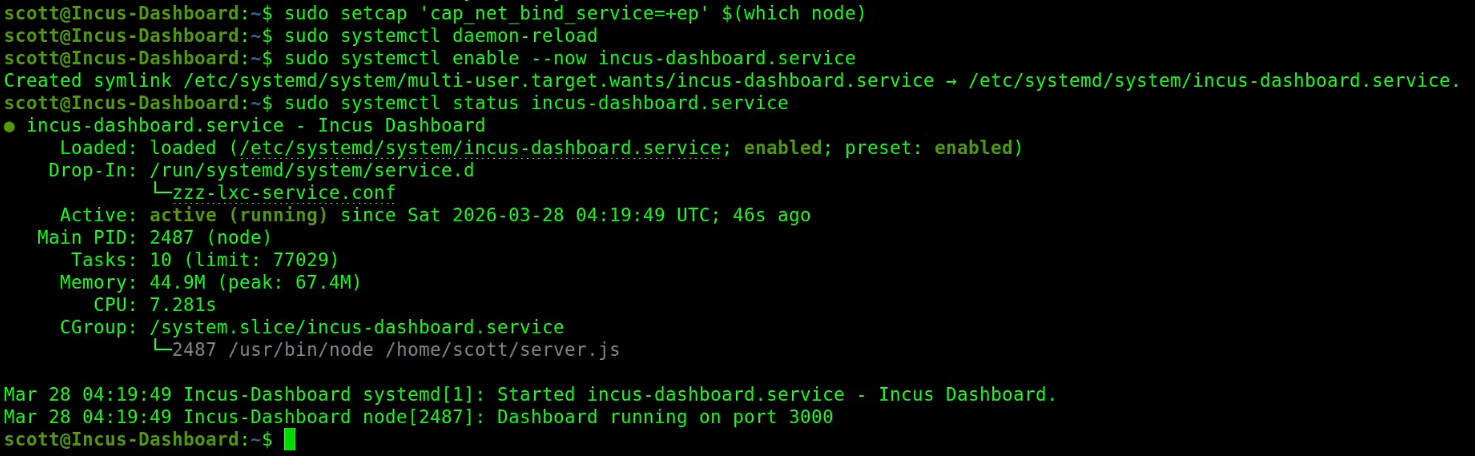
Check the status to see that it is running.
sudo systemctl status incus-dashboard.service
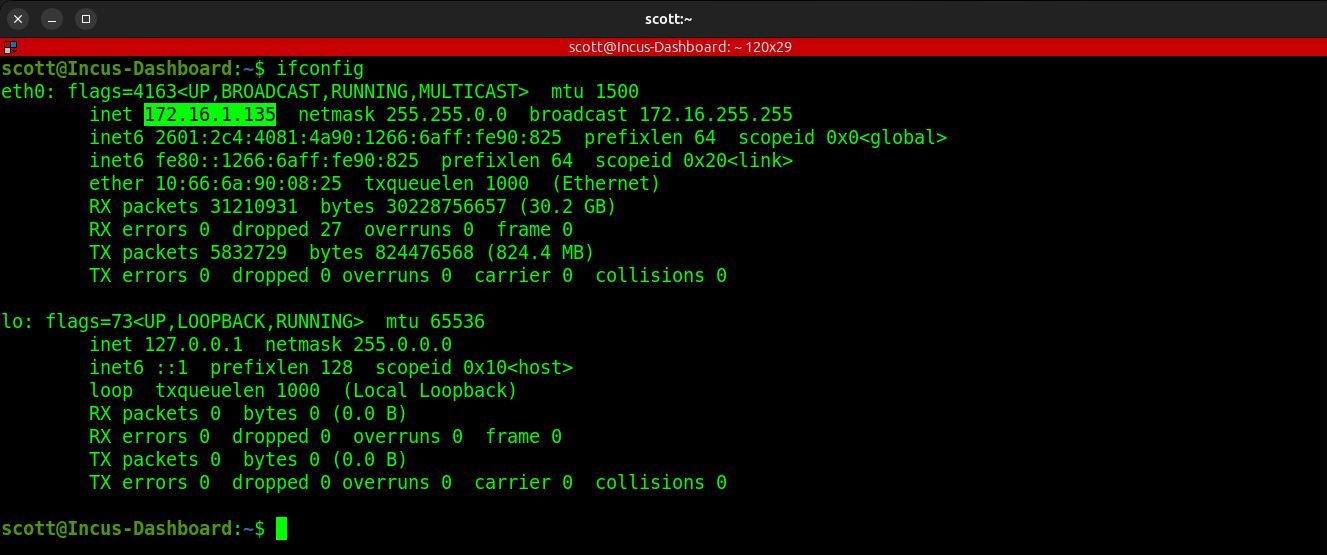
Find out the address of eth0 on your container.
ifconfig
Your address will differ of course.
Go to the address you found for eth0 in your web browser.
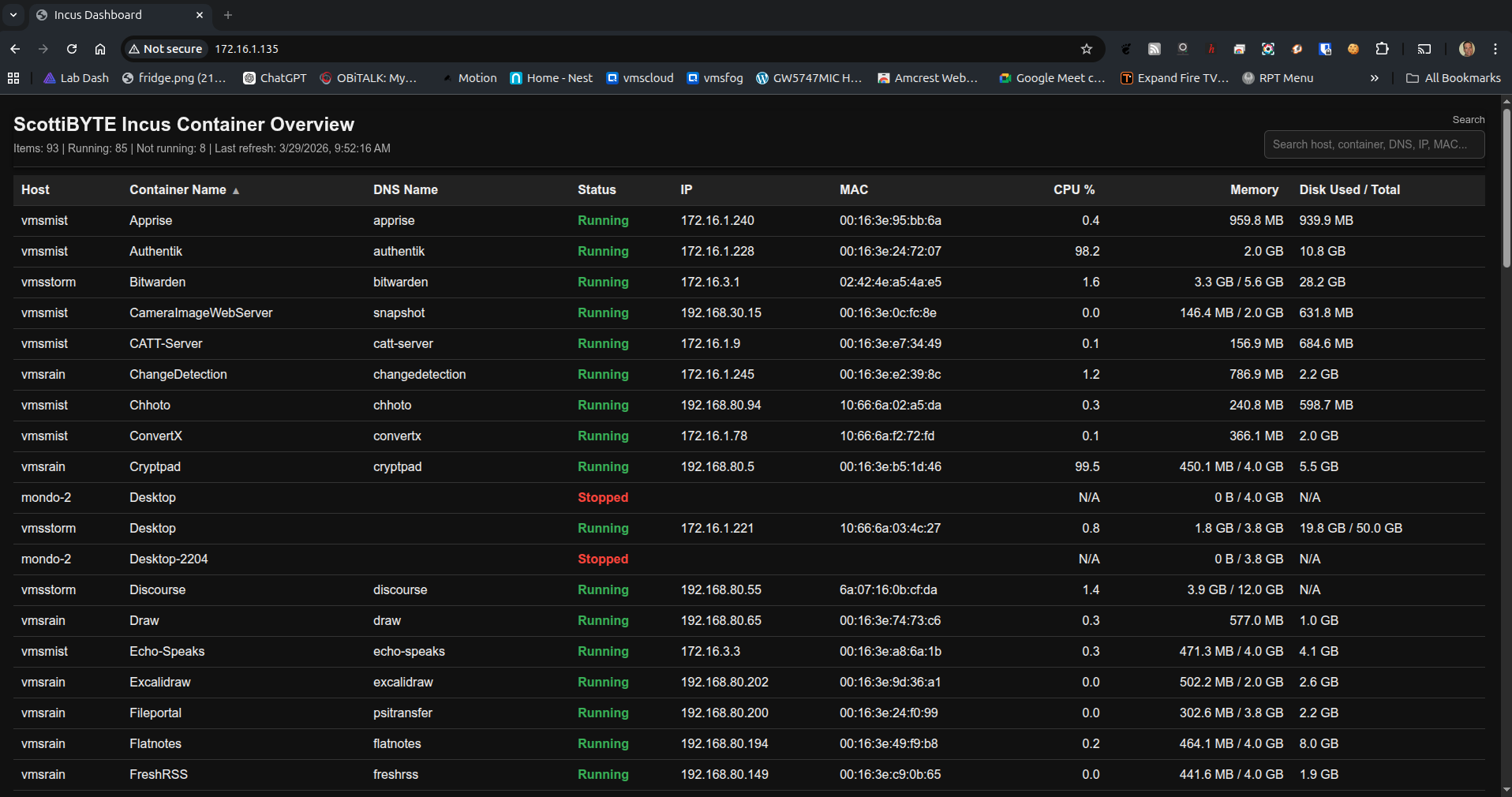
You can always go back and add additional new Incus servers to track by following the process above.